
Guides · 9 min read
✨ fastFOREX API MCP is now Generally Available - let your agents manage your fastFOREX API ✨

By Chris Maule

A daily exchange rate is not the same thing as the 5pm New York close, and the difference can be large enough to change a revaluation. This guide shows developers how to take the closing rate for a given day from the fastFOREX API, with working JavaScript, and covers the traps that catch people out: daylight saving, bid versus midpoint, and weekends.
It came from a real question. A trading-technology firm asked us how to take a daily USD rate for about 20 currencies, gold, silver, platinum, palladium and Bitcoin, all at 17:00 New York, to revalue trades. Every figure below comes from a real API response.
The foreign exchange market has no single exchange and no closing bell. It trades continuously, 24 hours a day, five days a week, from Sunday evening to Friday evening New York time, as trading moves from Sydney and Tokyo to London and New York.
To give that continuous market a daily rhythm, the industry uses a convention: the FX trading day ends, and the next one begins, at 17:00 New York time. That is when overnight positions roll to the next value date, and when many brokers, trading platforms and banks mark their books. In FX trading, "the close" usually means this moment. Friday's 17:00 is also the end of the trading week.
It is not the only daily rate in use. Accounting and tax rules may call for transaction-date rates, monthly averages or official reference rates, such as the ECB's euro reference rates (taken at 14:10 Central European Time) or the WM/Reuters 4pm London fix. If your organisation has a valuation policy, follow it. This guide is for when that policy says "17:00 New York".
In this guide, the closing rate means the last recorded bid and ask in the minute ending at 17:00 New York. It is measured to the minute, not a tick at exactly 17:00:00, and it is a market rate from our feed, not an official fixing. The FX market is decentralised, so different providers can legitimately show slightly different prices at the same moment; you can read where our prices come from.
A quick unit: FX prices move in pips, the fourth decimal place for most pairs (the second for yen pairs). EUR/USD moving from 1.1190 to 1.1200 is a move of 10 pips.
17:00 in New York is not a fixed time in UTC, because New York observes daylight saving time:
| New York time | UTC | When |
|---|---|---|
| 17:00 (EDT) | 21:00 | Second Sunday in March to first Sunday in November |
| 17:00 (EST) | 22:00 | First Sunday in November to second Sunday in March |
So "21:00 UTC every day" is wrong for about four months of the year, over the winter, and "22:00 UTC every day" is wrong for the other eight. Let a time zone database do the work rather than hard-coding either.
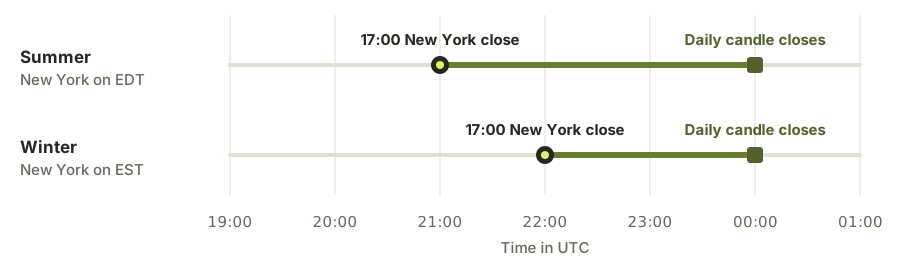
The fastFOREX API returns minute candles in UTC, labelled by the start of the minute. The last minute before the close, 16:59 to 17:00 New York, is the 20:59 UTC candle in summer and the 21:59 UTC candle in winter.
The obvious shortcut is to ask for a daily candle and use its close. On fastFOREX API, daily candles run from midnight to midnight UTC, so their close is the last price before midnight UTC: two or three hours after New York has closed, once Asian trading has begun.
Neither price is wrong. They are measured at different times, for different purposes. But substituting one for the other moves the number. On Tuesday 3 November 2026, the daily EUR/USD candle closed at 1.12065, while the minute ending at 17:00 New York closed at 1.11906, a difference of 16 pips.
$ curl -G https://api.fastforex.io/fx/ohlc/time-series \
    -H "X-API-Key: $FASTFOREX_API_KEY" \
    -d pair=EURUSD -d interval=PT1M \
    -d end=2026-11-03T21:59:00Z -d limit=1

{
  "pair": "EURUSD",
  "interval": "PT1M",
  "limit": 1,
  "size": 1,
  "dtmfmt": "ISO",
  "end": "2026-11-03T21:59:00Z",
  "tzOffset": "+00:00",
  "results": [
    { "dtm": "2026-11-03T21:59:00Z",
      "o": 1.11913, "h": 1.11924, "l": 1.11884, "c": 1.11906 }
  ],
  "ms": 8
}
With end set to the minute you want and limit=1, you get one candle back.
The one-minute candles are built from bid prices, so the close of 1.11906 above is the bid at the end of that minute. If your valuation policy specifies a midpoint, ask the quote time series for the same minute. It returns the closing bid and ask, and the midpoint is their average:
$ curl -G https://api.fastforex.io/fx/quote/time-series \
    -H "X-API-Key: $FASTFOREX_API_KEY" \
    -d pair=EURUSD -d interval=PT1M \
    -d end=2026-11-03T21:59:00Z -d limit=1

{
  "pair": "EURUSD",
  "interval": "PT1M",
  "limit": 1,
  "size": 1,
  "dtmfmt": "ISO",
  "end": "2026-11-03T21:59:00Z",
  "tzOffset": "+00:00",
  "results": [
    { "dtm": "2026-11-03T21:59:00Z",
      "bid": 1.11906, "ask": 1.11938 }
  ],
  "ms": 6
}
Two cautions. A midpoint is a reference price, not a price anyone could necessarily trade at. And spreads are often at their widest around 17:00 New York, while the trading day rolls over and liquidity is thin, so a single minute can be noisy. Some policies average the last few minutes instead. Whatever yours says, apply it the same way every day.
This JavaScript works out the right UTC minute for any date, whether New York is on summer or winter time, and returns the bid, ask and midpoint. It checks the API key, the HTTP status and the response, and refuses to return a price from the wrong minute. It runs in Node.js 18 or later.
const KEY = process.env.FASTFOREX_API_KEY;
if (!KEY) throw new Error('Set FASTFOREX_API_KEY');

// The start of the last one-minute candle before 17:00 New York, in UTC.
function nyCloseCandle(date) {
  const nyHour = (t) =>
    new Intl.DateTimeFormat('en-US', { timeZone: 'America/New_York', hour: 'numeric', hourCycle: 'h23' }).format(t);
  for (const utcHour of [21, 22]) {
    const close = new Date(`${date}T${utcHour}:00:00Z`);
    if (nyHour(close) === '17') return new Date(close.getTime() - 60_000).toISOString().replace('.000Z', 'Z');
  }
  throw new Error(`Could not find 17:00 New York on ${date}`);
}

async function nyClose(pair, date) {
  const candle = nyCloseCandle(date);
  const url = new URL('https://api.fastforex.io/fx/quote/time-series');
  url.search = new URLSearchParams({ pair, interval: 'PT1M', end: candle, limit: '1' });
  const res = await fetch(url, { headers: { 'X-API-Key': KEY } });
  const body = await res.json();
  if (!res.ok || body.error) throw new Error(`${pair}: ${body.error ?? `HTTP ${res.status}`}`);
  const quote = body.results?.[0];
  if (!quote) throw new Error(`${pair}: no quote returned for ${candle}`);
  // The API returns the latest quote at or before `end`. If it is earlier, there was no trading in that minute.
  if (quote.dtm !== candle) throw new Error(`No ${pair} quote at ${candle}: last one was ${quote.dtm}`);
  if (!Number.isFinite(quote.bid) || !Number.isFinite(quote.ask))
    throw new Error(`${pair}: bad quote ${JSON.stringify(quote)}`);
  // Keep full precision here; round only where your downstream system needs it.
  return { pair, at: quote.dtm, bid: quote.bid, ask: quote.ask, mid: (quote.bid + quote.ask) / 2, response: body };
}

const [date = '2026-11-03'] = process.argv.slice(2);
try {
  const { response, ...close } = await nyClose('EURUSD', date);
  console.log(close);
} catch (error) {
  console.error(error.message);
  process.exitCode = 1;
}
JavaScript numbers are binary floating point, so a midpoint can come out as 1.1159599999999998 rather than 1.11596. That is fine for display; if you store rates in a financial system, use a decimal type there, and round to the precision the pair is quoted in.
October 2026 ended on a Saturday. Ask for the close on 31 October and there is no quote in that minute, so the code above refuses:
$ node ny-close.mjs 2026-10-31
No EURUSD quote at 2026-10-31T20:59:00Z: last one was 2026-10-30T23:49:00Z
That timestamp is worth a second look: 23:49 UTC is 19:49 New York, nearly three hours after the week's close. Prices can keep arriving after the close, so "the latest price before Saturday" is not Friday's close. Ask for Friday's date explicitly instead.
Three different situations deserve three different rules, and your valuation policy should say which applies:
Gold, silver, platinum and palladium use the same approach, with instrument in place of pair, but their market behaves a little differently at the close. Spot precious metals also trade around the clock from Sunday to Friday, with a daily one-hour pause from 17:00 to 18:00 New York. So the minute ending at 17:00 New York is the last one before that pause, and it shows:
$ curl -G https://api.fastforex.io/metals/quote/time-series \
    -H "X-API-Key: $FASTFOREX_API_KEY" \
    -d instrument=XAUUSD -d interval=PT1M \
    -d end=2026-10-30T20:59:00Z -d limit=1

{
  "instrument": "XAUUSD",
  "interval": "PT1M",
  "limit": 1,
  "dtmfmt": "ISO",
  "end": "2026-10-30T20:59:00Z",
  "tzOffset": "+00:00",
  "results": [
    { "dtm": "2026-10-30T20:59:00Z",
      "bid": 3872.96, "ask": 3877.28 }
  ],
  "ms": 7
}
Crypto is different. It trades seven days a week, and the API serves live crypto prices rather than minute history, so you can't go back later and fetch a 17:00 price. Instead, run a scheduled job at 17:00 New York that calls the live endpoint and stores the result with the time it was taken:
$ curl -G https://api.fastforex.io/crypto/fetch-prices \
    -H "X-API-Key: $FASTFOREX_API_KEY" \
    -d pairs=BTC/USD

{
  "prices": { "BTC/USD": 73451.09 },
  "ms": 2
}
A scheduled job never runs at exactly 17:00:00. Scheduling delays and network time mean the price is observed a few seconds later, so record the time you actually took it, and don't describe it as a historical cutoff price.
The minute candles and quote time series above come with the Premium plan, from $54/month. On any plan, including One from $18/month, there are two simpler options:
/fetch-multi at the close and store the result. On One, midpoint rates update every 60 seconds. As with crypto, you can't go back for a close you missed./historical: simple, and decades deep, but it is not the 5pm New York close, so make sure your policy says which one you use.Save more than the number. For each rate, keep:
Never store your API key with the request. With those records, anyone can see exactly where a revaluation figure came from, months later. Keep them as long as your record-keeping rules require, and check your data licence allows it: with fastFOREX API, talk to us if you need to keep rates after a subscription ends.
You can try all of this on the free 7-day trial, with full-feature access and no credit card.
No. It is a market convention for the end of the FX trading day, taken from live market prices. If your accounting policy or a regulator requires an official fixing, such as the ECB reference rate, use that instead.
It varies by currency pair. For the major pairs, one-minute candles start in March 2021, hourly candles in May 2019, and daily candles go back as far as the 1970s. The /fx/pairs/historical-limits endpoint gives the earliest date for each pair and interval.
One call per currency pair per day. Twenty currencies and four metals come to about 24 calls a day, or roughly 500 a month, well inside the 1,000,000 calls included on every plan.
All data provided by fastFOREX API is for information only and is not intended for trading or investing purposes.

Written by
Chris Maule
Tech entrepreneur with 30 years of experience leading successful software and data companies. Chris shares practical insights into financial data and APIs across forex, cryptocurrencies and precious metals, to help readers evaluate data providers and build reliable applications.
Product news and guides from the fastFOREX API team, when we publish them.
By subscribing you agree to our Privacy Policy.


Get your free API key and start pulling live rates in minutes.